 By Danielle Evaland
Why guessing isn't good enough
Most business owners have never once checked what an AI says about them. That made sense two years ago, when almost nobody was asking. It doesn't anymore. Your customers have quietly changed how they look for a business like yours, and the AI is now answering on your behalf whether you've checked its work or not.
Here's how fast this moved. In the past year, the share of consumers who used an AI tool like ChatGPT, Gemini or Perplexity to find a local business jumped from 6% to 45%, according to BrightLocal's 2026 Local Consumer Review Survey. AI is now the third most-used way people find local businesses, sitting behind only Google and Facebook, and ahead of Yelp and Tripadvisor.
Now the uncomfortable half. When SOCi's 2026 Local Visibility Index tested nearly 350,000 business locations, ChatGPT recommended just 1.2% of them, and the business details it did have were only about 68% accurate. So even if you're being talked about, there's a real chance the AI is naming a competitor, or getting your hours, your services or your location wrong. You can't fix what you can't see, and you can't see it by guessing.
Good news: checking is genuinely easy, completely free, and takes about the length of a coffee break. You just have to do what your customer does, and pay attention to the answer.
How to check, step by step
The fastest, most honest way to see your AI visibility is to become your own customer for five minutes. Open the tools, ask the questions they'd ask, and read what comes back. Here's the exact routine I run.
That's it. No login gymnastics, no tools to buy, no technical skill. If you sell to people in a particular area, add your town or suburb to every question, because that's how local customers actually phrase it, and it's how the AI decides who's nearby.
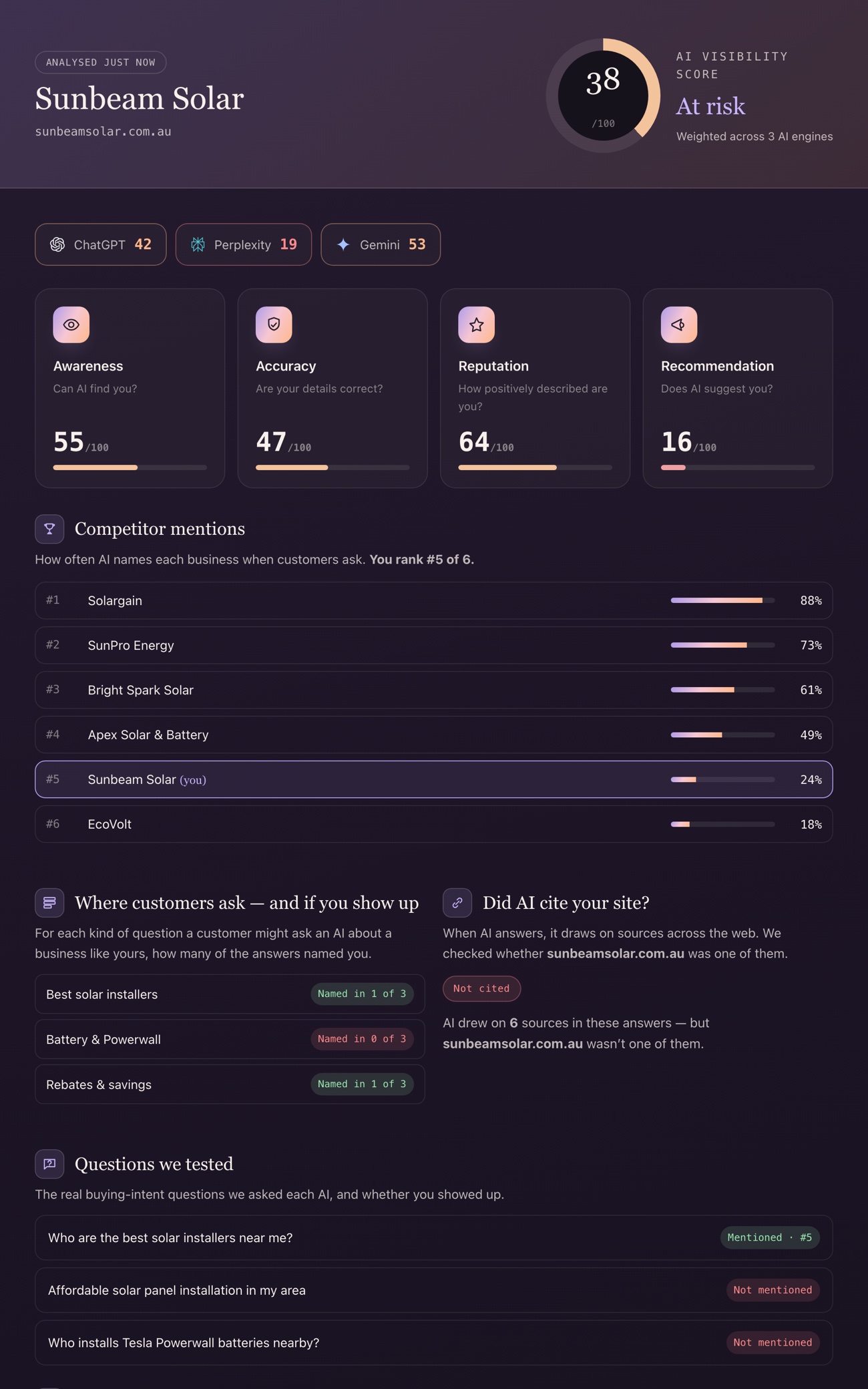
Short on time? Our free AI Visibility Audit runs this exact check for you – across ChatGPT, Perplexity and Gemini at once – in about 60 seconds, then scores whether you're named, accurate and recommended. Same routine as above, done automatically and graded.
What to look for in the answer
When you read the reply, you're grading it on three things, in order. Each one is a different kind of problem with a different fix.
- Are you named? The most basic test. If you ask for the best business of your type in your town and you're nowhere in the answer, the AI either can't find you or doesn't trust you enough to say your name. That's a visibility problem.
- Are the facts right? When it does describe you, check every detail: what you do, where you are, your hours, your specialties. Wrong facts quietly send customers to the wrong place or make you look worse than you are. That's an accuracy problem.
- Are you recommended, or just mentioned? There's a big difference between "you could also try [you]" at the bottom of a list and being the confident first pick with a reason to choose you. That's a reputation and trust problem.
Named, accurate, recommended. Those three words are your whole scorecard. Most businesses fail on at least one, and knowing which one tells you exactly what to fix first.
One honest warning: AI answers aren't fixed. Ask the same question twice and the wording will shift, and it can change again next week as the AI reads new information. So don't treat one lucky answer as "sorted." What you're looking for is the pattern across a few tries, in a few engines, over time. If you want the deeper reasons the facts go wrong in the first place, we cover them in why AI gets your business facts wrong.
Why you must check more than one AI

This is the step most people skip, and it's the one that matters most. The AI engines don't share a single brain. They read different sources, so they reach different conclusions about you. The same SOCi study makes the size of the gap almost comical: ChatGPT recommended 1.2% of businesses, Gemini recommended 11%, and Perplexity 7.4%. You can be invisible in one and recommended in another, on the very same day.
There's a practical reason for this, and it's genuinely useful to understand. Google's Gemini leans heavily on Google Maps and Google Business Profile data, which is why the same study found business details on Gemini were essentially 100% accurate. ChatGPT and Perplexity pull from a wider, messier mix of websites, directories and mentions, which is why their accuracy dropped to around 68%.
What this tells you to do: a clean, complete Google Business Profile isn't just good for Google anymore. It's the foundation Gemini reads from directly, so fixing it lifts your accuracy in AI answers too. It's one of the highest-value hours you can spend.
So checking one engine and stopping is like reading one review and deciding your whole reputation. Run your questions through all three, and note where you're strong and where you vanish. That map is your to-do list.
See where the AI got its facts
Here's a step almost nobody uses, and it turns "the AI is wrong about me" from a mystery into a fixable job. Most engines now show their sources. In Perplexity they're listed right under the answer. In ChatGPT and Google's AI, look for the little citation links or the "sources" it references. Click them.
Those links tell you which pages the AI trusted when it described you. If it says your business closes at 4pm and that's wrong, one of those sources is where the 4pm came from – an old directory listing, a stale Facebook page, a review site with the wrong hours. Now you know exactly what to go and correct, instead of guessing.
AI doesn't invent your business out of thin air. It repeats what it reads about you around the web. Fix the source, and you fix the answer – often within a few weeks.
It's worth checking whether your own website is even among the sources. If the AI is describing you using everyone's pages except your own, that's a strong sign your site isn't easy for AI to read, and your competitors' version of you is winning by default. That's fixable too, and we walk through it in how to make your website readable to AI.
What to do with what you find
Once you've checked, you'll land in one of three places, and each one has a clear next move.
| What you saw | What it means | First move |
|---|---|---|
| Not named at all | AI can't find or trust you yet | Fix how readable your site is and get your listings consistent |
| Named, but facts are wrong | Bad information is spreading from a source | Find the source in the citations and correct it everywhere |
| Mentioned, but not recommended | You're known but not trusted enough to pick | Build reviews, mentions and clearer proof you're the right choice |
My honest take, after doing this for a lot of businesses: the checking is the easy part, and it's genuinely worth doing yourself so you feel the problem rather than take my word for it. The fixing is where it gets fiddly, because it stretches across your website, your Google profile, your reviews and a dozen directories that all have to agree. It's very doable, it's just detailed.
You can't manage what AI says about you until you've looked. Ten minutes of looking beats a year of assuming you're fine.
Danielle Evaland, Founder of EvaraIf you'd rather not piece it together by hand, that's the whole reason we built our free AI Visibility Audit. It asks ChatGPT, Perplexity and Gemini about your business the way a customer would, checks whether you're named, accurate and recommended, and hands you a plain-English score with the fixes that matter most, in about a minute. Do it yourself with the steps above, or let the audit do the legwork. Either way, the one thing not to do is keep guessing.